

Tuesday, April 03, 2007
0
Tuesday, April 03, 2007
ATUL DOGRA
Keyboard Tricks
If few keys of your keyboard have stopped working but still you love your keyboard , than don't worry you don't need to buy a new one because their are few keyboard tricks by which you can type the result of those keys .
Like suppose your keyboards B button is not working so try this :- fist check that num lock key is on to green position than now hold Alt key and type 66 and than release alt button and the result you will get on document will be B . This trick is working fine in windows .
So their is a list of these button tricks which is known as ASCII characters (American Standard Code for Information Interchange ) .

Even i was facing problem for E button in my keyboard but now its going fine with this trick . It happens mostly because of the pc games or piano keyboard because we press those keys continuously for high score and better results .You can copy this picture and save it your computer , I hope it will help you .
read more
Like suppose your keyboards B button is not working so try this :- fist check that num lock key is on to green position than now hold Alt key and type 66 and than release alt button and the result you will get on document will be B . This trick is working fine in windows .
So their is a list of these button tricks which is known as ASCII characters (American Standard Code for Information Interchange ) .

Even i was facing problem for E button in my keyboard but now its going fine with this trick . It happens mostly because of the pc games or piano keyboard because we press those keys continuously for high score and better results .You can copy this picture and save it your computer , I hope it will help you .
Monday, April 02, 2007
3
Monday, April 02, 2007
ATUL DOGRA
 From last few days i have been looking for Digital Camera of different brands like Nikon , Canon , sony and main things make them different is their prices but now their is one small digital video camera which can suit everyone budgets and yes this camera is one of the best hot seat product on ebay from last few weeks .
Brand name of the company is DigiGR8 and their production origin is in China . Model number - DV-182 is one of the best smallest pocket digi cam with many multi functions like Digital Cam recorder ,Digital Camera , Voice Recorder , Web Cam , PC/TV Playback ,3.1 Mega Pixels , 1.5" color TFT LCD screen and many more in very cheap price . It supports Microsoft Windows 98SE/ME/2000/XP and in India sellers are providing 6 months warranty also .
Todays branded simple digital cams for photo shoot cost us almost $ 70to $ 100 , so if you are planing to buy a new cam take a look on this cams features and specially on cost .you can search for DigiGR8 on Google or in ebay.com and checkout your local ebay sellers , may be they are providing you more months warranty . I have just booked one for me and waiting for it .
read more
Digital Camera for $75
 From last few days i have been looking for Digital Camera of different brands like Nikon , Canon , sony and main things make them different is their prices but now their is one small digital video camera which can suit everyone budgets and yes this camera is one of the best hot seat product on ebay from last few weeks .
Brand name of the company is DigiGR8 and their production origin is in China . Model number - DV-182 is one of the best smallest pocket digi cam with many multi functions like Digital Cam recorder ,Digital Camera , Voice Recorder , Web Cam , PC/TV Playback ,3.1 Mega Pixels , 1.5" color TFT LCD screen and many more in very cheap price . It supports Microsoft Windows 98SE/ME/2000/XP and in India sellers are providing 6 months warranty also .
Todays branded simple digital cams for photo shoot cost us almost $ 70to $ 100 , so if you are planing to buy a new cam take a look on this cams features and specially on cost .you can search for DigiGR8 on Google or in ebay.com and checkout your local ebay sellers , may be they are providing you more months warranty . I have just booked one for me and waiting for it .
Sunday, April 01, 2007
0
Sunday, April 01, 2007
ATUL DOGRA
 Today everyone tries to fool each other by their ways , so their are few software for webmaster so they can fool their friends in digital ways . I have collected a list of April fool prank softwares which are most downloaded and wanted softwares for April fool .
1. Replace keys :- This software allows us to replace keyboard strokes with different keys and replaced keys make it appear that the user has mis typed the wrong key on keyboard .
2. Copy cursor :- This program starts with no user interface and begin copy the current user mouse and paste it where the mouse was on the desktop And after few minutes you will be able to see funny prank that his screen will be containing hundreds of mouse pointers .
3. Avoid button :- This software is really , it makes the window start button run away and avoid your mouse clicks .Just set this on your friends pc and let him get busy for several hours to get click on start button .
4. The finger :-This software changes your cursor into familiar middle finger which we don't use normally.Finger it on an unsuspecting user and watch their reaction when the cursor changes to the middle finger and then back to normal again.
read more
April fool softwares
 Today everyone tries to fool each other by their ways , so their are few software for webmaster so they can fool their friends in digital ways . I have collected a list of April fool prank softwares which are most downloaded and wanted softwares for April fool .
1. Replace keys :- This software allows us to replace keyboard strokes with different keys and replaced keys make it appear that the user has mis typed the wrong key on keyboard .
2. Copy cursor :- This program starts with no user interface and begin copy the current user mouse and paste it where the mouse was on the desktop And after few minutes you will be able to see funny prank that his screen will be containing hundreds of mouse pointers .
3. Avoid button :- This software is really , it makes the window start button run away and avoid your mouse clicks .Just set this on your friends pc and let him get busy for several hours to get click on start button .
4. The finger :-This software changes your cursor into familiar middle finger which we don't use normally.Finger it on an unsuspecting user and watch their reaction when the cursor changes to the middle finger and then back to normal again.
Saturday, March 31, 2007
1
Saturday, March 31, 2007
ATUL DOGRA
Firefox smart keys
When we surf on net or either we are doing some work , first thing comes in our mind is how can it be done more fast . So if you are using firefox than there are few smart which can help you to work more fast . So check them out I hope they will help you .
1. Back -> Shift + scroll down or backspace
2. Forward -> Shift + scroll up
3. Close tab -> Middle click on that tab you want to close ( or if your mouse have scroll button than click that scroll button on that tab) .
4. Open new tab -> Double click left button on tab bar .
5. Full Screen -> F11 ( don't change screen resolution first try this ) .
6. Decrease Text Size -> Ctrl + scroll up .
7. Increase Text Size -> Ctrl + scroll down .
8. Bookmarks -> Ctrl + b .
9. Find words on specific webpage -> F3
10. Reload page -> F5
This is a list of the most smart shortcuts I use while working on firefox .
read more
1. Back -> Shift + scroll down or backspace
2. Forward -> Shift + scroll up
3. Close tab -> Middle click on that tab you want to close ( or if your mouse have scroll button than click that scroll button on that tab) .
4. Open new tab -> Double click left button on tab bar .
5. Full Screen -> F11 ( don't change screen resolution first try this ) .
6. Decrease Text Size -> Ctrl + scroll up .
7. Increase Text Size -> Ctrl + scroll down .
8. Bookmarks -> Ctrl + b .
9. Find words on specific webpage -> F3
10. Reload page -> F5
This is a list of the most smart shortcuts I use while working on firefox .
Friday, March 30, 2007
0
Friday, March 30, 2007
ATUL DOGRA
Mario and Sonic Olympic Games
World's top gamer companies announced that Mario and Sonic characters are staring together in the Olympic Games(themed sports title on Nintendo ) . The game will be available for Christmas 2007 and is licensed through International Sports Multimedia (ISM) .
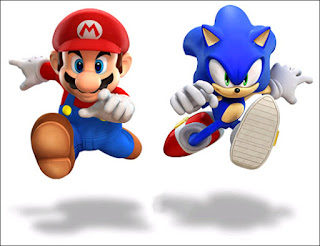
In this new Olympic game players will play in events which have different stages and their view would be based on the official venues of the Beijing 2008 Olympic Games . Game contains 100m track, engage in exhilarating rallies in table tennis and churn water in a swimming heat, all while competing for the much sought after gold medal. News via Gamespot .
read more

In this new Olympic game players will play in events which have different stages and their view would be based on the official venues of the Beijing 2008 Olympic Games . Game contains 100m track, engage in exhilarating rallies in table tennis and churn water in a swimming heat, all while competing for the much sought after gold medal. News via Gamespot .
Thursday, March 29, 2007
0
Thursday, March 29, 2007
ATUL DOGRA
Paypal option in Skype Beta 3.2
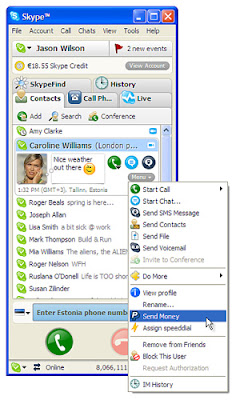
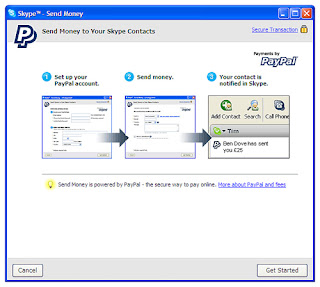
Skype Beta 3.2 Users can now send and receive money to each other accounts via using skype . This system is very easy to use . Both receiver and sender need to have paypal account and if someone has already sent money to your email than also no problem you can create one account on that same email id and receive that amount later also .
It's features is subjected to paypal limitations - Your country must be supported by paypal for sending and receiving money .If you send money to someone where paypal facility is not available than don't worry if that money is not received from receiver than your money will be back to your accounts or credit cards . So it's fine no fear for money lost also .
read more
It's features is subjected to paypal limitations - Your country must be supported by paypal for sending and receiving money .If you send money to someone where paypal facility is not available than don't worry if that money is not received from receiver than your money will be back to your accounts or credit cards . So it's fine no fear for money lost also .


0
ATUL DOGRA
Super Search Engine
Now we don't have to waste time for searching contents in different search engine one by one because now we have one super search engine which can search content online using Google, Yahoo, MSN Live Search and Ask.com at the same time.

New webfetch allows its users to search multiple leading search engines at once with most relevant results . It provides us search in different leadings like web search , image search ,audio Search,video search , news search , business listings , people finder provider .And if you find a result you want than you can search that website for more pages with same keywords search terms . This is an easy way to find more in-depth information on relevant sites.
Best point is webfetch will allow its users earn ipoints every time you search using webfetch . You can exchange ipoints for a range of products and services.
http://www.webfetch.co.uk/
read more

New webfetch allows its users to search multiple leading search engines at once with most relevant results . It provides us search in different leadings like web search , image search ,audio Search,video search , news search , business listings , people finder provider .And if you find a result you want than you can search that website for more pages with same keywords search terms . This is an easy way to find more in-depth information on relevant sites.
Best point is webfetch will allow its users earn ipoints every time you search using webfetch . You can exchange ipoints for a range of products and services.
http://www.webfetch.co.uk/
1
ATUL DOGRA
Take Malware Quiz
Guys most people who think that they know all about spyware, Trojans, viruses, and other malware really don't. Take this quiz to make sure you know who your enemies are.
This quiz tests your knowledge of five of the most common kinds of malware, the software you don't want on your computer: Trojan, worm, virus, spyware, and adware. Keep in mind that there are at least seven other kinds of malware we know about.
The answers are located at the end of the quiz.
1. Which of the following is most likely to make your computer stop working?
a. Trojan
b. Worm
c. Virus
d. Spyware
e. Adware
2. Which of the following is not a stand-alone program?
a. Trojan
b. Worm
c. Virus
d. Spyware
e. Adware
3. Which of the following is most likely to send spam emails from your computer?
a. Trojan
b. Worm
c. Virus
d. Spyware
e. Adware
4. Which of the following is lest likely to be detected with standard antivirus software?
a. Trojan
b. Worm
c. Virus
d. Spyware
e. Adware
5. Which of the following is most likely to come with other malware?
a. Trojan
b. Worm
c. Virus
d. Spyware
e. Adware
6. Which of the following is bundled with the peer-to-peer file-sharing software, Kazaa?
a. Trojan
b. Worm
c. Virus
d. Spyware
e. Adware
7. Which of the following is most likely to install a "backdoor" internet connection?
a. Trojan
b. Worm
c. Virus
d. Spyware
e. Adware
8. Which of the following is most likely to be involved in a denial-of-service attack?
a. Trojan
b. Worm
c. Virus
d. Spyware
e. Adware
9. Which of the following is the only malware publicly documented as having been employed by the FBI to bring a suspect to trial?
a. Trojan
b. Worm
c. Virus
d. Spyware
e. Adware
10. Which of the following is most likely to steal your identity?
a. Trojan
b. Worm
c. Virus
d. Spyware
e. Adware
Answers:
1. c. virus. Trojans, worms, spyware, and adware all depend on your computer staying up and running. They use your computer's resources to accomplish whatever their designer intended, such as sending emails, displaying advertising, or stealing information from your computer. Viruses, however, are usually created by vandals who just want to damage as many computers as possible.
2. c. virus. Viruses are not stand-alone programs. Just as biological viruses must take over the cells of their host in order to function and reproduce; computer viruses must take over one or more files of the computer on which they are stored. Trojans, worms, spyware, and adware are all stand-alone programs that can run without the help of another application, though they often come bundled with other applications as a decoy, or with other malware.
3. b. worm. Worms are stand-alone programs that are often used to send spam emails, or emails containing viruses. Trojans often contain worms which are then installed for the purpose of sending spam emails, but the worms are what actually send the emails.
4. e. adware. In the strictest sense, adware is rarely patently illegal or destructive, and so antivirus software makers have traditionally avoided treating it as malware. Adware designers are usually large advertising companies with hundreds of millions of dollars, and they take care to insert end-user licensing agreements (EULA) that supposedly mean that the software is installed with permission. Also, adware will not usually do anything more destructive than show advertising. Nonetheless, adware can quickly multiply on a computer, hogging system resources and causing a computer to slow down or even malfunction. That's why most anti-spyware software makers target adware as well.
5. a. Trojan. By definition, Trojans bear other malware within them, just as the mythical wooden worse bore Greek warriors. The malware can be viruses, worms, spyware, or adware.
6. e. adware, though d. spyware, is also correct. Kazaa's developers, Sharman Networks, make most of their money from the advertising shown by the included adware. The adware typically runs even when the Kazaa software is not in use. Sharman Networks has adamantly denied that the adware that comes with Kazaa is spyware, since, like most adware, it comes with an end-user license agreement that says the user grants permission for the software to be installed. In reality, few Kazaa users, until recently, were aware of just how much adware was being installed on their machines (as much as a dozen or more). Plus, the adware does monitor your internet usage, and so is spyware in the strictest sense.
7. b. worm. Worms most commonly install a "backdoor" internet connection in order to send out data (for instance, spam emails or requests to remote servers) undetected.
8. b. worm. Worms, which most commonly install a "backdoor" internet connection on the host computer, are perfect for sending out the millions of server requests needed to achieve a denial-of-service attack. A denial-of-service attack is when a server is maliciously sent so many hits that it is overwhelmed and cannot continue to operate.
9. a. Trojan. The Trojan "Magic Lantern" was famously used to install monitoring software on the computer of a suspect who was later brought to trial partly on the strength of the evidence gathered.
10. e. Spyware. Spyware is malware that collects information from your computer and sends it to another remote machine, so by definition any software that steals your identity is spyware. However, spyware is often installed on your computer by a Trojan, or sent to you by another computer infected with a worm, so other kinds of malware pose an indirect threat of identity theft as well.
This wonderfull quiz was created by Joel Walsh .He writes for spyware-refuge.com about spyware, viruses, Trojans, adware, worms, and other malware .
read more
This quiz tests your knowledge of five of the most common kinds of malware, the software you don't want on your computer: Trojan, worm, virus, spyware, and adware. Keep in mind that there are at least seven other kinds of malware we know about.
The answers are located at the end of the quiz.
1. Which of the following is most likely to make your computer stop working?
a. Trojan
b. Worm
c. Virus
d. Spyware
e. Adware
2. Which of the following is not a stand-alone program?
a. Trojan
b. Worm
c. Virus
d. Spyware
e. Adware
3. Which of the following is most likely to send spam emails from your computer?
a. Trojan
b. Worm
c. Virus
d. Spyware
e. Adware
4. Which of the following is lest likely to be detected with standard antivirus software?
a. Trojan
b. Worm
c. Virus
d. Spyware
e. Adware
5. Which of the following is most likely to come with other malware?
a. Trojan
b. Worm
c. Virus
d. Spyware
e. Adware
6. Which of the following is bundled with the peer-to-peer file-sharing software, Kazaa?
a. Trojan
b. Worm
c. Virus
d. Spyware
e. Adware
7. Which of the following is most likely to install a "backdoor" internet connection?
a. Trojan
b. Worm
c. Virus
d. Spyware
e. Adware
8. Which of the following is most likely to be involved in a denial-of-service attack?
a. Trojan
b. Worm
c. Virus
d. Spyware
e. Adware
9. Which of the following is the only malware publicly documented as having been employed by the FBI to bring a suspect to trial?
a. Trojan
b. Worm
c. Virus
d. Spyware
e. Adware
10. Which of the following is most likely to steal your identity?
a. Trojan
b. Worm
c. Virus
d. Spyware
e. Adware
Answers:
1. c. virus. Trojans, worms, spyware, and adware all depend on your computer staying up and running. They use your computer's resources to accomplish whatever their designer intended, such as sending emails, displaying advertising, or stealing information from your computer. Viruses, however, are usually created by vandals who just want to damage as many computers as possible.
2. c. virus. Viruses are not stand-alone programs. Just as biological viruses must take over the cells of their host in order to function and reproduce; computer viruses must take over one or more files of the computer on which they are stored. Trojans, worms, spyware, and adware are all stand-alone programs that can run without the help of another application, though they often come bundled with other applications as a decoy, or with other malware.
3. b. worm. Worms are stand-alone programs that are often used to send spam emails, or emails containing viruses. Trojans often contain worms which are then installed for the purpose of sending spam emails, but the worms are what actually send the emails.
4. e. adware. In the strictest sense, adware is rarely patently illegal or destructive, and so antivirus software makers have traditionally avoided treating it as malware. Adware designers are usually large advertising companies with hundreds of millions of dollars, and they take care to insert end-user licensing agreements (EULA) that supposedly mean that the software is installed with permission. Also, adware will not usually do anything more destructive than show advertising. Nonetheless, adware can quickly multiply on a computer, hogging system resources and causing a computer to slow down or even malfunction. That's why most anti-spyware software makers target adware as well.
5. a. Trojan. By definition, Trojans bear other malware within them, just as the mythical wooden worse bore Greek warriors. The malware can be viruses, worms, spyware, or adware.
6. e. adware, though d. spyware, is also correct. Kazaa's developers, Sharman Networks, make most of their money from the advertising shown by the included adware. The adware typically runs even when the Kazaa software is not in use. Sharman Networks has adamantly denied that the adware that comes with Kazaa is spyware, since, like most adware, it comes with an end-user license agreement that says the user grants permission for the software to be installed. In reality, few Kazaa users, until recently, were aware of just how much adware was being installed on their machines (as much as a dozen or more). Plus, the adware does monitor your internet usage, and so is spyware in the strictest sense.
7. b. worm. Worms most commonly install a "backdoor" internet connection in order to send out data (for instance, spam emails or requests to remote servers) undetected.
8. b. worm. Worms, which most commonly install a "backdoor" internet connection on the host computer, are perfect for sending out the millions of server requests needed to achieve a denial-of-service attack. A denial-of-service attack is when a server is maliciously sent so many hits that it is overwhelmed and cannot continue to operate.
9. a. Trojan. The Trojan "Magic Lantern" was famously used to install monitoring software on the computer of a suspect who was later brought to trial partly on the strength of the evidence gathered.
10. e. Spyware. Spyware is malware that collects information from your computer and sends it to another remote machine, so by definition any software that steals your identity is spyware. However, spyware is often installed on your computer by a Trojan, or sent to you by another computer infected with a worm, so other kinds of malware pose an indirect threat of identity theft as well.
This wonderfull quiz was created by Joel Walsh .He writes for spyware-refuge.com about spyware, viruses, Trojans, adware, worms, and other malware .
0
ATUL DOGRA
How To Fix Windows XP Errors
Windows XP has quickly become one the most popular computer operating systems on the planet! But there exist as many errors
and problems that can occur in Windows XP as there are stars in the heavens it seems...
So we're going to show you how to effectively Repair Windows XP below!
One of the best features of Windows XP is the built in repair feature!
In previous versions of Windows, repairing an operating system error usually meant formatting and reinstalling the whole
operating system, resulting in loss of all of your precious data. The Windows XP repair feature won't delete your data,
already installed programs, personal information or Windows settings. It just repairs the operating system...
Note: The system repair function will remove any updates you have previously installed that are not included on the CD. Any
windows Drivers will also be reverted to their original XP versions, as well as some settings (network & performance
settings may sometimes be reset to their defaults). It may be necessary to reactivate your Windows XP as well. When finished,
you will have to download all of the updates from Microsoft Windows Update, because they are all replaced during repair.
Why would you ever want to reinstall Windows XP?
1. Can't start Windows XP in safe mode.
2. You have problems caused by a recently installed system update (Windows Update, hotfix, Windows XP service pack, or
Microsoft Internet Explorer update).
3. Your problems can't be solved with system restore, or you can't access system restore.
4. You've installed a new motherboard, or made other major hardware changes and need to reinstall Windows.
Of course, if you are just trying to resolve Windows XP errors and problems, and want to save yourself some MAJOR time and
effort...
Repair Windows XP Installation: Step-by-step:
1: Make certain there are no known hardware issues. Windows repair will ONLY fix software problems. Hardware issues can also
cause boot problems (i.e. bad hard drive, memory, CPU, or power supply).
2: Make Sure & Backup Your Data. It's always a good idea to backup your important data before making changes to Windows XP.
Don't worry, if you follow these instructions your data will be secure and there for you when the windows xp repair is completed.
3: Boot from your Windows XP CD. Insert the Windows XP CD into your computer's CD-ROM or DVD-ROM drive, and then restart your
computer. When the "Press any key to boot from CD" message appears on the screen, press a key to start your computer from
the Windows XP CD.
4: A blue screen will appear and begin loading Windows XP Setup from the CD.
Note: RAID/SCSI/Unsupported UDMA users:
You will be prompted to "press F6 to install any third party SCSI or RAID drivers". Most users will not have to press F6, but
if you are running RAID, SCSI or unsupported UDMA controllers, then you will have to have your controller drivers on a floppy
disk. If you are unsure whether you have RAID/SCSI, then simply let the CD load without pressing F6.
When completed loading files, you will be presented with the following "Windows Setup" screen, and your first option. Select
"To set up Windows XP now, press ENTER". DO NOT select Recovery Console.
When presented with the End User License agreement screen. press the F8 key to continue.
Next, Windows Setup will find existing Windows XP installations. You will be asked to repair an existing XP installation, or
install a fresh copy of Windows XP.
If no installations are found, then you will not be given the option to repair. This may happen if the data or partition on
your drive is too corrupted.
Note: If you install a fresh copy, all data on that partition will be lost!
You are almost through! Windows XP will look like it is installing itself for the first time, but it will keep and
remember all of your data and settings. Just follow the prompts, and have your CD-KEY ready if needed.
WARNING: Due to the proliferation of the Welchia, Blaster and other Worm/Viruses that are prevlanet online...be aware that a
Repair Install will leave your system vulnerable. You can get infected within seconds.
Do not go on line until you have enabled XP's firewall first, and make sure and download and run the free and effective
XoftSPySE Spyware remover & blocker on your PC..It is one of the best we've tested!
Don't forget to run Windows Update! (install critical updates first)
Author: Gary Bracken
Want an easier way to fix Windows XP errors? Download the Free RegCure
Registry Cleaner Scan. It found and repaired 822 errors on our test system and boosted system performance by 15%!
read more
and problems that can occur in Windows XP as there are stars in the heavens it seems...
So we're going to show you how to effectively Repair Windows XP below!
One of the best features of Windows XP is the built in repair feature!
In previous versions of Windows, repairing an operating system error usually meant formatting and reinstalling the whole
operating system, resulting in loss of all of your precious data. The Windows XP repair feature won't delete your data,
already installed programs, personal information or Windows settings. It just repairs the operating system...
Note: The system repair function will remove any updates you have previously installed that are not included on the CD. Any
windows Drivers will also be reverted to their original XP versions, as well as some settings (network & performance
settings may sometimes be reset to their defaults). It may be necessary to reactivate your Windows XP as well. When finished,
you will have to download all of the updates from Microsoft Windows Update, because they are all replaced during repair.
Why would you ever want to reinstall Windows XP?
1. Can't start Windows XP in safe mode.
2. You have problems caused by a recently installed system update (Windows Update, hotfix, Windows XP service pack, or
Microsoft Internet Explorer update).
3. Your problems can't be solved with system restore, or you can't access system restore.
4. You've installed a new motherboard, or made other major hardware changes and need to reinstall Windows.
Of course, if you are just trying to resolve Windows XP errors and problems, and want to save yourself some MAJOR time and
effort...
Repair Windows XP Installation: Step-by-step:
1: Make certain there are no known hardware issues. Windows repair will ONLY fix software problems. Hardware issues can also
cause boot problems (i.e. bad hard drive, memory, CPU, or power supply).
2: Make Sure & Backup Your Data. It's always a good idea to backup your important data before making changes to Windows XP.
Don't worry, if you follow these instructions your data will be secure and there for you when the windows xp repair is completed.
3: Boot from your Windows XP CD. Insert the Windows XP CD into your computer's CD-ROM or DVD-ROM drive, and then restart your
computer. When the "Press any key to boot from CD" message appears on the screen, press a key to start your computer from
the Windows XP CD.
4: A blue screen will appear and begin loading Windows XP Setup from the CD.
Note: RAID/SCSI/Unsupported UDMA users:
You will be prompted to "press F6 to install any third party SCSI or RAID drivers". Most users will not have to press F6, but
if you are running RAID, SCSI or unsupported UDMA controllers, then you will have to have your controller drivers on a floppy
disk. If you are unsure whether you have RAID/SCSI, then simply let the CD load without pressing F6.
When completed loading files, you will be presented with the following "Windows Setup" screen, and your first option. Select
"To set up Windows XP now, press ENTER". DO NOT select Recovery Console.
When presented with the End User License agreement screen. press the F8 key to continue.
Next, Windows Setup will find existing Windows XP installations. You will be asked to repair an existing XP installation, or
install a fresh copy of Windows XP.
If no installations are found, then you will not be given the option to repair. This may happen if the data or partition on
your drive is too corrupted.
Note: If you install a fresh copy, all data on that partition will be lost!
You are almost through! Windows XP will look like it is installing itself for the first time, but it will keep and
remember all of your data and settings. Just follow the prompts, and have your CD-KEY ready if needed.
WARNING: Due to the proliferation of the Welchia, Blaster and other Worm/Viruses that are prevlanet online...be aware that a
Repair Install will leave your system vulnerable. You can get infected within seconds.
Do not go on line until you have enabled XP's firewall first, and make sure and download and run the free and effective
XoftSPySE Spyware remover & blocker on your PC..It is one of the best we've tested!
Don't forget to run Windows Update! (install critical updates first)
Author: Gary Bracken
Want an easier way to fix Windows XP errors? Download the Free RegCure
Registry Cleaner Scan. It found and repaired 822 errors on our test system and boosted system performance by 15%!
1
ATUL DOGRA
Indian tutors will teach UK students online
A Bangalore based online tuition firm has tied up with publisher HarperCollins to provide off-shored tuition to British students . TutorVista , the online teaching outfit is aiming to attract middle class families by providing one-on-one access to Indian tutors at very cheap rates related to British coaches , who charges 50 pound per hour .
This firm will recruit Indian university graduates as tutors and provide them six weeks training to understand them companies technology as well as ways to tackle the accent barrier with students . Students are coached via an online platform that is downloaded on to a home computer and includes an interactive white-board , an instant messaging tool and an internet phone system .Under the deal with HarperCollins, the publisher will promote TutorVista services on its titles. Content from Harper Collins will be used by the Bangalore firm for online learning aids.
However, the firm, which sold about 1,000 hours of lessons last month to about 150 students in the UK and firm also operates in the United States, where it has signed up 950 students. It offers sessions covering every subject offered at A-level and GSCE in Britain. However, 80 per cent of lessons that it has sold so far have been in mathematics.
Now India is also getting innovative in education field very fast speed let see what would be the results of these online coaching systems . News via rediff .
read more
This firm will recruit Indian university graduates as tutors and provide them six weeks training to understand them companies technology as well as ways to tackle the accent barrier with students . Students are coached via an online platform that is downloaded on to a home computer and includes an interactive white-board , an instant messaging tool and an internet phone system .Under the deal with HarperCollins, the publisher will promote TutorVista services on its titles. Content from Harper Collins will be used by the Bangalore firm for online learning aids.
However, the firm, which sold about 1,000 hours of lessons last month to about 150 students in the UK and firm also operates in the United States, where it has signed up 950 students. It offers sessions covering every subject offered at A-level and GSCE in Britain. However, 80 per cent of lessons that it has sold so far have been in mathematics.
Now India is also getting innovative in education field very fast speed let see what would be the results of these online coaching systems . News via rediff .
Subscribe to:
Posts (Atom)


