

Showing posts with label online tutors. Show all posts
Showing posts with label online tutors. Show all posts
Tuesday, September 14, 2010
1
Tuesday, September 14, 2010
ATUL DOGRA
Java Database connectivity guide from DataBase Guide
Java database connectivity is basically an application that enables users to access pertinent data by the use of queries. The users can update significant information within the given database. The program supports the access to files from spreadsheets, flat files and databases transforming into backstage access to database independent to database management system used. Java database connectivity provides an easy to use platform by choosing the most appropriate platform to use. One simply needs to retrieve an object from the driver manager.

High availability usually describes a network and all of its components available for data input, processing and report. The system determines the success depending on planning and understanding the tolerance that would affect the network. Even at small corporation level, high availability is desirable and necessary. As system failure should not bring down the entire system, so fault tolerance is important measure of high availability system. Thus creating such a high availability system involving extensive planning with least potential failure is very important.
Disasters may occur naturally or man made and is usually difficult to predict their occurrence. Disaster recovery is the ability of a system to recovery its entire electronic data in shortest possible time interval. It involves a lot of forward planning and policy settings. Possibilities involve facing a number of threats like hacking, electrical failure, human error and natural disasters. Keeping off-site data backups may be sufficient for smaller corporations, but in case of a larger corporation it would be provisioned and costed as a part of their annual budget.
Merging two or more databases and producing a meaningful report is what we call as data integration. It is thought as a major headache for IT professionals. Databases are designed such that they suit the need of the software used and not for merging purposes. Creating a report would mean combining a number of databases having different formats. Merging requires special database combining skills. So, compatibility between various databases by implementing new versions is the need of IT departments these days. So, many of the bigger companies in the corporate world were created thru data merging using different software and databases.
Thus in Java database connection, one would learn to manipulate certain files in order to develop query statements. One needs to keep in mind that they are represented by statements, prepared statements and callable statements procedure.
read more

High availability usually describes a network and all of its components available for data input, processing and report. The system determines the success depending on planning and understanding the tolerance that would affect the network. Even at small corporation level, high availability is desirable and necessary. As system failure should not bring down the entire system, so fault tolerance is important measure of high availability system. Thus creating such a high availability system involving extensive planning with least potential failure is very important.
Disasters may occur naturally or man made and is usually difficult to predict their occurrence. Disaster recovery is the ability of a system to recovery its entire electronic data in shortest possible time interval. It involves a lot of forward planning and policy settings. Possibilities involve facing a number of threats like hacking, electrical failure, human error and natural disasters. Keeping off-site data backups may be sufficient for smaller corporations, but in case of a larger corporation it would be provisioned and costed as a part of their annual budget.
Merging two or more databases and producing a meaningful report is what we call as data integration. It is thought as a major headache for IT professionals. Databases are designed such that they suit the need of the software used and not for merging purposes. Creating a report would mean combining a number of databases having different formats. Merging requires special database combining skills. So, compatibility between various databases by implementing new versions is the need of IT departments these days. So, many of the bigger companies in the corporate world were created thru data merging using different software and databases.
Thus in Java database connection, one would learn to manipulate certain files in order to develop query statements. One needs to keep in mind that they are represented by statements, prepared statements and callable statements procedure.
Friday, December 05, 2008
6
Friday, December 05, 2008
ATUL DOGRA
Awesome Steps to Make Your Computer Faster Ever
Whenever our computer hangs up it remind us old days when it was new and booting speed was like wish . You name it or click it and have it . But don't worry , you don't have to keep dreaming about that booting speed because you can get that speed back if few easy steps . I can say that it will run like new but yes you can make it to boot faster and make your computer faster than previous old speed .
You can follow this steps and make it better :
1. Delete all wastage : Remove everything which is not in use . Like if you installed games or programs which are not in use right now that go to control panel and uninstall them .You can keep their setup with you if they are important and install them in future when they are required .
1.1 Remove all Temp files : Remove all temporary Internet files and Windows temporary files . Always cleanup your Recycle Bin when you go for shutdown .
2. Make windows startup Fast :- To make you system upload faster you can stop auto start for few programs . Like you can stop all those programs which you don't need at starting . Just go to start button and click on run option . Than type "msconfig" and press ok . Now one new pop-up will open in which you will find startup option at top bar [ For example you can check image below] .

After selecting startup option you will see program list and from them you can deselect few of them which you don't want to run at starting . You can stop all unnecessary programs like Instant messengers yahoo messenger , rediff bol , gtalk etc which ever you are using . Few more files like real player or any other player which start automatically .
Startup Delayer : If you don't want to remove any program from their and use it daily than you can use Startup Delayer . This application helps you to setup a time for program to upload after windows startup .
3. Cleanup your system : After deleting and removing all unwanted stuff we can go for cleanup process . You can go to Disk cleanup by clicking on all programs and than accessories than you can see system tools[check image below] .

After selecting desik cleanup you can clean your all drives one by one . In c drive don't select any setup files and delete all other temp files . After Completing process that box will automaticall close .
3.1 Disk Defragmenter : Again go to system tools and select Disk Defragmenter option .In the Disk Defragmenter box select the drives One by one for defragmentation .First select any drive then click the Analyze button . When the drive is analyzed new dialog box popups in which you will find defragmentation option . You can click on it and let the drive get defragmnted .
3.2 Software for cleaning system : It is a freeware system cleaning tool which you can download from this link Download CCleaner .CCleaner removes unused files from your system and helps Windows to run faster by freeing your disk space .
4. Always use good antivrus : To keep your all confidential information personal you must use good security system , which will help you to save yourself from different virus attack risks like hacking viruses , trojans , malwares and spywares . If you can't or don't want to buy a Antivirus Software than also their is no problem because you can get some best Antivirus Software free of cost online .
Download Free Antivirus Softwares :
1. Avira Anti-Vir : Download Free version of Avira Anti-Vir AntiVirus for personal and non-commercial use .
2. Avast free home Edition : Avast is a free antivirus software with spyware protection . Free edition copies must be used in non-commercial & home use only . Download Avast free home Edition antivirus .
3.AVG Anti-Virus : AVG Anti-Virus Free Edition has been widely regarded as a free security software for home users for the security of computer systems protection. Download AVG Anti-Virus free .
For more good free Antivirus softwares you can go and check this page . Dowload Free Antivirus softwares .
Always remeber that you must not fill your all drives heavily and keep installing new softwares . If you want try it than install it but if it is not usefull than uninstall them same time and keep your pc stomach clean like yours . Don not install anyupdate from any website because most of those programs keeps spywares and steal your all informations . When ever you go for sleep do defregmentation to keep it faster and delete all coockies and temp files too .
read more
You can follow this steps and make it better :
1. Delete all wastage : Remove everything which is not in use . Like if you installed games or programs which are not in use right now that go to control panel and uninstall them .You can keep their setup with you if they are important and install them in future when they are required .
1.1 Remove all Temp files : Remove all temporary Internet files and Windows temporary files . Always cleanup your Recycle Bin when you go for shutdown .
2. Make windows startup Fast :- To make you system upload faster you can stop auto start for few programs . Like you can stop all those programs which you don't need at starting . Just go to start button and click on run option . Than type "msconfig" and press ok . Now one new pop-up will open in which you will find startup option at top bar [ For example you can check image below] .

After selecting startup option you will see program list and from them you can deselect few of them which you don't want to run at starting . You can stop all unnecessary programs like Instant messengers yahoo messenger , rediff bol , gtalk etc which ever you are using . Few more files like real player or any other player which start automatically .
Startup Delayer : If you don't want to remove any program from their and use it daily than you can use Startup Delayer . This application helps you to setup a time for program to upload after windows startup .
3. Cleanup your system : After deleting and removing all unwanted stuff we can go for cleanup process . You can go to Disk cleanup by clicking on all programs and than accessories than you can see system tools[check image below] .

After selecting desik cleanup you can clean your all drives one by one . In c drive don't select any setup files and delete all other temp files . After Completing process that box will automaticall close .
3.1 Disk Defragmenter : Again go to system tools and select Disk Defragmenter option .In the Disk Defragmenter box select the drives One by one for defragmentation .First select any drive then click the Analyze button . When the drive is analyzed new dialog box popups in which you will find defragmentation option . You can click on it and let the drive get defragmnted .
3.2 Software for cleaning system : It is a freeware system cleaning tool which you can download from this link Download CCleaner .CCleaner removes unused files from your system and helps Windows to run faster by freeing your disk space .
4. Always use good antivrus : To keep your all confidential information personal you must use good security system , which will help you to save yourself from different virus attack risks like hacking viruses , trojans , malwares and spywares . If you can't or don't want to buy a Antivirus Software than also their is no problem because you can get some best Antivirus Software free of cost online .
Download Free Antivirus Softwares :
1. Avira Anti-Vir : Download Free version of Avira Anti-Vir AntiVirus for personal and non-commercial use .
2. Avast free home Edition : Avast is a free antivirus software with spyware protection . Free edition copies must be used in non-commercial & home use only . Download Avast free home Edition antivirus .
3.AVG Anti-Virus : AVG Anti-Virus Free Edition has been widely regarded as a free security software for home users for the security of computer systems protection. Download AVG Anti-Virus free .
For more good free Antivirus softwares you can go and check this page . Dowload Free Antivirus softwares .
Always remeber that you must not fill your all drives heavily and keep installing new softwares . If you want try it than install it but if it is not usefull than uninstall them same time and keep your pc stomach clean like yours . Don not install anyupdate from any website because most of those programs keeps spywares and steal your all informations . When ever you go for sleep do defregmentation to keep it faster and delete all coockies and temp files too .
Sunday, July 27, 2008
3
Sunday, July 27, 2008
ATUL DOGRA
Free blogging tools
If i just look at my past than according to me blogging for beginners is not so easy . When i started blogging i was crazy and i was spending more than 15 hours daily online on reading blogging guidelines and how to make money via blogging . But it took few months when i understood that nothing is so easy and blogging is not a children game , where we can keep posting and earning money . Their are many other works and methods we have to use after posting articles on blog .
Before posting content we need to do many more things like first all of we have to optimize everything so that everything look neat and give some professional look . After completing optimization we can publish content . Next we have to have to do publicity work by using social networks or other sources . Than in last we start tracking everything and check result and than analyze it for further steps . So here is the list of few tool which i have used and sharing with you .
Tool you should have in your blog option : -
1. Feed reader :- Always provide free updates by email service to your readers to they can stay updated and keep coming back . I will recommend you to go for FeedBurner .You can make subscription boxe at the end of post also , so when they finish reading article may be they would like to subscribe at that time too .
2. Translation tool : You will be surprised but yes translator tool is also very helpful for bloggers .I have few readers from other countries and they use flag translating options from my sidebar to read my blog in other languages too . So why should we miss such readers . You can add Babel fish translator tool to your blog from this link . Translate blog .
3. Keywords Tag boxes :- In blogger you have option to create label tags boxes and in wordpress you can using plugins for that too . By this users can select the specific keywords also in which they have interest . And tags boxes also helps to fill our blog with some good keywords too .
4. Search boxes :- I have seen many new bloggers those directly place google search box for earning and don't customize it with their blogs . So whenever someone search any keyword they directly go to google paid keywords search items and think they can earn few cents by this but remember if visitor will not get specific result than he will never visit your blog again .
5. Entrecard :- Entrecard is one of the hot option moving on right now and almost all blogger are using it . I have seen some pro blogger also using it like John Chow and others too . They have very simple process in which you have to visit other blogs and give them a drop and they will also do they same . But here when you visit someones blog you earn 1 EC point and when other visit your than also your earn point . You can use these point in advertisement or you can sell them to other users too .
6. Mybloglog :- Mybloglog is also same like Entrecard but here we don't get any point . In this website we get one widget which we can place on our blogs and check who visited our blog than via that widget you can go and check their blogs too . It is like You visit and I follow .
7. Twitter :- I have not used this tool but i think it is better tool to let your friends stay updated with your activities . By this tool you can update them with your latest post and updates of your blog too .
8. Digg :- I think digg is one of the best to tool to get some huge traffic as well as some good back links too . I have seen many new blogger keep searching for something new on digg and when they will something interesting they blog about it . So when you can also submit your stories on this site and let other users comment on that . By this you can interact with more people and gain more knowledge too .
9. Stumbleupon :- Stumbleupon is also a good website to make new friends and get some good traffic too . In this site we have download a toolbar and than when you visit any blog while surfing stumbleupon or other and like his content than you can give him a green thumb up and post a review about his blog in stumbleupon . That blogger owner can track your review and by this you can get one visitor and if your luck will work than you can get one review from his side too .
Their are many other top social websites with latest PR updates where you can submit your content and get some good traffic like :-
1. Del.icio.us - PR9
2. Slashdot - PR9
3. Bloglines - PR9
4. Connotea - PR8
5. Technorati - PR8
6. Propeller - PR8
7. Rojo - PR8
8. Furl - PR7
9. Reddit - PR7
10. CiteULike - PR7
11. Popurls - PR7
12. 43Things - PR7
13. Newsvine - PR7
14. Blogpulse - PR7
15. Nowpublic - PR7
After doing everything you now you can use some free tracking tools to check your traffic stats too .
1. Google Analytics :- It is one of the best tool and most of the webmasters believe in Google analytics stats only . By this tool you can check from where you are getting most of the traffic and work on it so you can improve your results online on those keywords .
2. Statcounter :- This website is also very useful and you can track your all visitors from search engines and referring websites too . You can also check the searched term keywords made by users and work on those keywords for future too .
If you need any further help than do let me know . I have few more tools which can help you in blogging but i will share them next time .
read more
Before posting content we need to do many more things like first all of we have to optimize everything so that everything look neat and give some professional look . After completing optimization we can publish content . Next we have to have to do publicity work by using social networks or other sources . Than in last we start tracking everything and check result and than analyze it for further steps . So here is the list of few tool which i have used and sharing with you .
Tool you should have in your blog option : -
1. Feed reader :- Always provide free updates by email service to your readers to they can stay updated and keep coming back . I will recommend you to go for FeedBurner .You can make subscription boxe at the end of post also , so when they finish reading article may be they would like to subscribe at that time too .
2. Translation tool : You will be surprised but yes translator tool is also very helpful for bloggers .I have few readers from other countries and they use flag translating options from my sidebar to read my blog in other languages too . So why should we miss such readers . You can add Babel fish translator tool to your blog from this link . Translate blog .
3. Keywords Tag boxes :- In blogger you have option to create label tags boxes and in wordpress you can using plugins for that too . By this users can select the specific keywords also in which they have interest . And tags boxes also helps to fill our blog with some good keywords too .
4. Search boxes :- I have seen many new bloggers those directly place google search box for earning and don't customize it with their blogs . So whenever someone search any keyword they directly go to google paid keywords search items and think they can earn few cents by this but remember if visitor will not get specific result than he will never visit your blog again .
Publicity
5. Entrecard :- Entrecard is one of the hot option moving on right now and almost all blogger are using it . I have seen some pro blogger also using it like John Chow and others too . They have very simple process in which you have to visit other blogs and give them a drop and they will also do they same . But here when you visit someones blog you earn 1 EC point and when other visit your than also your earn point . You can use these point in advertisement or you can sell them to other users too .
6. Mybloglog :- Mybloglog is also same like Entrecard but here we don't get any point . In this website we get one widget which we can place on our blogs and check who visited our blog than via that widget you can go and check their blogs too . It is like You visit and I follow .
7. Twitter :- I have not used this tool but i think it is better tool to let your friends stay updated with your activities . By this tool you can update them with your latest post and updates of your blog too .
8. Digg :- I think digg is one of the best to tool to get some huge traffic as well as some good back links too . I have seen many new blogger keep searching for something new on digg and when they will something interesting they blog about it . So when you can also submit your stories on this site and let other users comment on that . By this you can interact with more people and gain more knowledge too .
9. Stumbleupon :- Stumbleupon is also a good website to make new friends and get some good traffic too . In this site we have download a toolbar and than when you visit any blog while surfing stumbleupon or other and like his content than you can give him a green thumb up and post a review about his blog in stumbleupon . That blogger owner can track your review and by this you can get one visitor and if your luck will work than you can get one review from his side too .
Their are many other top social websites with latest PR updates where you can submit your content and get some good traffic like :-
1. Del.icio.us - PR9
2. Slashdot - PR9
3. Bloglines - PR9
4. Connotea - PR8
5. Technorati - PR8
6. Propeller - PR8
7. Rojo - PR8
8. Furl - PR7
9. Reddit - PR7
10. CiteULike - PR7
11. Popurls - PR7
12. 43Things - PR7
13. Newsvine - PR7
14. Blogpulse - PR7
15. Nowpublic - PR7
After doing everything you now you can use some free tracking tools to check your traffic stats too .
1. Google Analytics :- It is one of the best tool and most of the webmasters believe in Google analytics stats only . By this tool you can check from where you are getting most of the traffic and work on it so you can improve your results online on those keywords .
2. Statcounter :- This website is also very useful and you can track your all visitors from search engines and referring websites too . You can also check the searched term keywords made by users and work on those keywords for future too .
If you need any further help than do let me know . I have few more tools which can help you in blogging but i will share them next time .
Friday, July 25, 2008
2
Friday, July 25, 2008
ATUL DOGRA
How FTP servers are hacked and get down
One of my friend Shadab Nawaz from Digitalpoint forum was very sad because he provides online e-services on his website but his FTP server have been brutally hacked and hackers moved his websites to PORN content and filled his home pages with nude models .By this he faced some huge losses in online business and some of my clients also moved . After facing this incident he decided to go in depth and know that how they do all this .
Shadab Nawaz from Magicsolv International share his tips in this article that how hackers do all this and how we can save ourselves . So the Prevention is better than cure .
A Password Cracker is a piece of software that attempts to break into a system by trying many different user names and passwords.
To break a password, a Password Cracker uses two methods of attack to break into your account.
1) Brute Force Attack: In this type of attack, the software generates passwords of every possible combination of words, letters, or even symbols to try to break into your account. The longer the password, the longer it takes to break into the system. However, since computers are gearing up the speed every year (according to Moore's law, the computer speed doubles every 18 months), the time to break a password of any certain length reduces 50% every 1.5 years.
2) Dictionary Attack: This is a more clever method in which the attacker uses a pool of words such as names, common vocabularies, etc., and tries various combinations of them to crack the system. The pool of effective possible choices to use in the trial and error process is much smaller than in a Brute Force Attack because of the more confined choices of numbers and letters to combine. It is very easy to get a word list. Do a search on Google for the search phrase "word list" to look for many databases available on the web.
now lets come to the point.......How to Remember Your Password
Coming up with a password which is both easy to remember and safe is no easy task. Try one or all of these different techniques to create a secure but memorable password.
Develop a Truly Random Password and Use a Mnemonic Device
(*) Use software or, less reliable but usually effective enough, simply jot down letters and numbers as they come to your mind.
(*) Focus on each letter of the password. A way to remember a randomized, assigned difficult password, like "tthertd" can be simple and fun. Think of a sentence where there is one word beginning with each letter of the password, for example, "tthertd" could be "terrible tigers have every right to drive."
Develop an Algorithm
(*) Take the name of the website and then add the last four digits of a friend's home phone number to the end. (Don't use your own phone number, since a clever hacker could try the same algorithm in a dictionary attack.) The password for wikiHow might be "wikiHow4588". This is by way of example only because it is too easy for others to figure out but you would add your own personal twist. Maybe you would spell wikihow backwards. The more steps in your algorithm, and the more unpredictable each step is, the more secure your password.
Combine the Best of You
(*) Choose a favorite number (or two), a favorite word (or two), a favorite symbol (or two). Add the first one (or two) symbols that come to mind when you see the website address or the most prominent words on the sign-in page. Choose an order and put them all together into one long string.
Remove the Vowels
(*) Take a word or phrase and remove the vowels from it (for example, "eat the cheeseburger" becomes "tthchsbrgr").
Use the Keyboard
(*) If your password doesn't use the Q, A, or Z, you can hit the key to the left of your password. Or to the right if you don't use the P, L, or M. 'Speedracer' goes to both sides, but 'wikiHow' can become 'qujugiq' or 'eolojpe'. Shifting things up a key, choose left or right. 'wikiHow' becomes '28i8y92' or '39o9u03'. Shifting up and to the left is slightly more intuitive. Adding the other security measures afterwards is all trivial.
Combine Small Words
(*) Combine. A smart way to develop an easy to remember password is to combine three small words to make a single password. For example, you can use "howstopyes" or "earpengold". If you want an even easier to remember password, you can use words that are related to each other like "yesnomaybe". Be aware, however, that this is much less secure! It adds more security to capitalize the first letters of the different words: "ballzonecart" becomes "BallZoneCart".
Connect the first letters
(*) Develop a password using the first letters of a sentence or phrase that means something to you - like your national anthem or a slogan you have seen somewhere. 'Don't shop for it, Argos it' would become DsfiAi.
Use a Password Manager
(*) Use a password manager, such as "PasswordSafe", "Roboform" or "PassPack" to generate random passwords and then secure them using one master password.
Mix Words
(*) Choose two words and combine their letters to create the password, choosing one letter of the first word and one letter of the second word, and repeating this until you get to the last letter of each word. An example could be:
Words: house & plane
Password: hpoluasnee
Some other tips too.............. i found them on the web....
(*) Change numbers into Roman numerals for more security (i.e. iamcool2 becomes iamcoolii). You can even mix normal numbers and Roman numerals. 1i = 11; 1ii = 12; and so on.
(*)When coming up with a mnemonic sentence, try and make the sentence funny or relevant to yourself. That way you will find it easier to remember the sentence, so you can remember the password.
(*)The more complex and longer the password, the less likely it is to be cracked but it is often proportionately harder to remember.
(*)Mixing letters and numbers is always safer than just using numbers or just using letters.
(*)Try thinking of a name (BOB). Now use only every second letter, being BB. Then go back and plug any other letter you did not type. Your password would be BBO.
Enjoy, and if you have other innovative ways to remember difficult passwords, let me know.
PS: Shadab Nawaz have collected and compiled this info from various websites while i was got everything on dp and i am just sharing it with others .
read more
Shadab Nawaz from Magicsolv International share his tips in this article that how hackers do all this and how we can save ourselves . So the Prevention is better than cure .
A Password Cracker is a piece of software that attempts to break into a system by trying many different user names and passwords.
To break a password, a Password Cracker uses two methods of attack to break into your account.
1) Brute Force Attack: In this type of attack, the software generates passwords of every possible combination of words, letters, or even symbols to try to break into your account. The longer the password, the longer it takes to break into the system. However, since computers are gearing up the speed every year (according to Moore's law, the computer speed doubles every 18 months), the time to break a password of any certain length reduces 50% every 1.5 years.
2) Dictionary Attack: This is a more clever method in which the attacker uses a pool of words such as names, common vocabularies, etc., and tries various combinations of them to crack the system. The pool of effective possible choices to use in the trial and error process is much smaller than in a Brute Force Attack because of the more confined choices of numbers and letters to combine. It is very easy to get a word list. Do a search on Google for the search phrase "word list" to look for many databases available on the web.
now lets come to the point.......How to Remember Your Password
Coming up with a password which is both easy to remember and safe is no easy task. Try one or all of these different techniques to create a secure but memorable password.
Develop a Truly Random Password and Use a Mnemonic Device
(*) Use software or, less reliable but usually effective enough, simply jot down letters and numbers as they come to your mind.
(*) Focus on each letter of the password. A way to remember a randomized, assigned difficult password, like "tthertd" can be simple and fun. Think of a sentence where there is one word beginning with each letter of the password, for example, "tthertd" could be "terrible tigers have every right to drive."
Develop an Algorithm
(*) Take the name of the website and then add the last four digits of a friend's home phone number to the end. (Don't use your own phone number, since a clever hacker could try the same algorithm in a dictionary attack.) The password for wikiHow might be "wikiHow4588". This is by way of example only because it is too easy for others to figure out but you would add your own personal twist. Maybe you would spell wikihow backwards. The more steps in your algorithm, and the more unpredictable each step is, the more secure your password.
Combine the Best of You
(*) Choose a favorite number (or two), a favorite word (or two), a favorite symbol (or two). Add the first one (or two) symbols that come to mind when you see the website address or the most prominent words on the sign-in page. Choose an order and put them all together into one long string.
Remove the Vowels
(*) Take a word or phrase and remove the vowels from it (for example, "eat the cheeseburger" becomes "tthchsbrgr").
Use the Keyboard
(*) If your password doesn't use the Q, A, or Z, you can hit the key to the left of your password. Or to the right if you don't use the P, L, or M. 'Speedracer' goes to both sides, but 'wikiHow' can become 'qujugiq' or 'eolojpe'. Shifting things up a key, choose left or right. 'wikiHow' becomes '28i8y92' or '39o9u03'. Shifting up and to the left is slightly more intuitive. Adding the other security measures afterwards is all trivial.
Combine Small Words
(*) Combine. A smart way to develop an easy to remember password is to combine three small words to make a single password. For example, you can use "howstopyes" or "earpengold". If you want an even easier to remember password, you can use words that are related to each other like "yesnomaybe". Be aware, however, that this is much less secure! It adds more security to capitalize the first letters of the different words: "ballzonecart" becomes "BallZoneCart".
Connect the first letters
(*) Develop a password using the first letters of a sentence or phrase that means something to you - like your national anthem or a slogan you have seen somewhere. 'Don't shop for it, Argos it' would become DsfiAi.
Use a Password Manager
(*) Use a password manager, such as "PasswordSafe", "Roboform" or "PassPack" to generate random passwords and then secure them using one master password.
Mix Words
(*) Choose two words and combine their letters to create the password, choosing one letter of the first word and one letter of the second word, and repeating this until you get to the last letter of each word. An example could be:
Words: house & plane
Password: hpoluasnee
Some other tips too.............. i found them on the web....
(*) Change numbers into Roman numerals for more security (i.e. iamcool2 becomes iamcoolii). You can even mix normal numbers and Roman numerals. 1i = 11; 1ii = 12; and so on.
(*)When coming up with a mnemonic sentence, try and make the sentence funny or relevant to yourself. That way you will find it easier to remember the sentence, so you can remember the password.
(*)The more complex and longer the password, the less likely it is to be cracked but it is often proportionately harder to remember.
(*)Mixing letters and numbers is always safer than just using numbers or just using letters.
(*)Try thinking of a name (BOB). Now use only every second letter, being BB. Then go back and plug any other letter you did not type. Your password would be BBO.
Enjoy, and if you have other innovative ways to remember difficult passwords, let me know.
PS: Shadab Nawaz have collected and compiled this info from various websites while i was got everything on dp and i am just sharing it with others .
Saturday, June 28, 2008
1
Saturday, June 28, 2008
ATUL DOGRA
Backlinks from High Page Rank for Free
This post is written to help readers to know that how they can get free back links , So remember that we are telling you the method but not providing free back links .Their are so many pro webmasters and internet promoters those invest thousands of dollars to get get relevant back links from High Page ranks to stay in top in search results . But their some more options to get relevant back links also which bloggers apply like running keyword trains , tagging each other . So today we will share one nice tip with you by which you can get free back links from high page ranks .
All of us know that forums are the best way today to get free traffic as well as back links to out blogs and websites . But one quality and niche related relevant links can boost our page ranks . So their are thousands of forums on different niche if you can find some good and high page ranks forums related to your niche than you can get back link .
Learn how to get links related to niche :-
1. First go to google.com main search page .
2. Now in search box type this line [ site:.com/phpbb2 intitle:"your keyterm" ]
3. Don't copy these open and close brackets and type keywords related to your niche in place of [ your keyterm ] . You can type tech , blogging , online money anything which suits to your niche and than make search by hitting enter key .
4. Now you can visit relevant forums related to your niche and become a member of that forum . Now you can add your blog or website links in given signature links slots .
I have been working on this from last few days and got some good results . I think this will help you to get a free back links from relevant niche which can provide some good results to your serp's .
read more
All of us know that forums are the best way today to get free traffic as well as back links to out blogs and websites . But one quality and niche related relevant links can boost our page ranks . So their are thousands of forums on different niche if you can find some good and high page ranks forums related to your niche than you can get back link .
Learn how to get links related to niche :-
1. First go to google.com main search page .
2. Now in search box type this line [ site:.com/phpbb2 intitle:"your keyterm" ]
3. Don't copy these open and close brackets and type keywords related to your niche in place of [ your keyterm ] . You can type tech , blogging , online money anything which suits to your niche and than make search by hitting enter key .
4. Now you can visit relevant forums related to your niche and become a member of that forum . Now you can add your blog or website links in given signature links slots .
I have been working on this from last few days and got some good results . I think this will help you to get a free back links from relevant niche which can provide some good results to your serp's .
Saturday, April 21, 2007
4
Saturday, April 21, 2007
ATUL DOGRA
Add Google sitemap to get your blog crawled in google search easily .
If you have submitted your blog in Google search engine but it is not indexing your most of the web pages than adding Google sitemap to your blog is an easy way to get your pages indexed in Google search . To add Google sitemap on your blog just follow these steps :
1. Fist go to Google sitemap webpage .
2. Login to Google account and enter your blog name in add-site bar than click ok .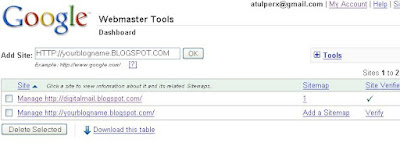
3. Next click on Verify your site link .
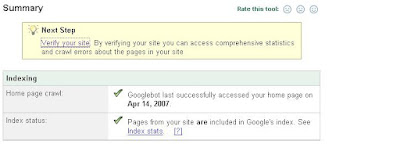
4. Now you will find options for verification , choose meta tag verification .
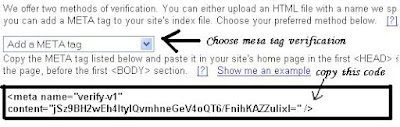
5. Now copy meta tag verification code and paste this Meta tag after template head section and save your template than publish it .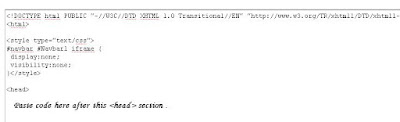
6. Now get back to webmaster webpage and click on verify button .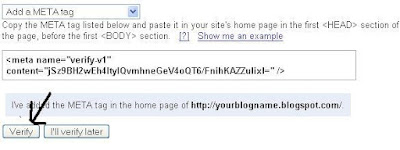
7. Click on add Sitemap and Choose add general web sitemap option .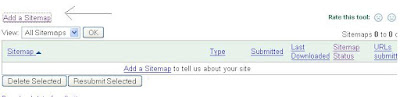
8. Enter my sitemap url as [ your blog name .atom.xml ] .
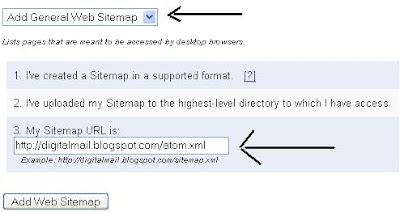
Now you have added a sitemap to your blog . Reports may take several hours to update.
read more
1. Fist go to Google sitemap webpage .
2. Login to Google account and enter your blog name in add-site bar than click ok .

3. Next click on Verify your site link .

4. Now you will find options for verification , choose meta tag verification .

5. Now copy meta tag verification code and paste this Meta tag after template head section and save your template than publish it .

6. Now get back to webmaster webpage and click on verify button .

7. Click on add Sitemap and Choose add general web sitemap option .

8. Enter my sitemap url as [ your blog name .atom.xml ] .

Now you have added a sitemap to your blog . Reports may take several hours to update.
Friday, April 13, 2007
0
Friday, April 13, 2007
ATUL DOGRA
Learn how to do Podcasting
Podcasting is one of the best tool for webmaster to reach millions of people online daily . Now only websites but we can see many blogger are also providing podcasting for their visitors and i think this is the best way for publicity also , because many visitors are very lazy and they don't like to read whole articles of website but with the help of podcasting they can minimize that window and hear the digital audio recordings which can contain audio version of that article or anything else you want to podcast .
If you want to start your podcasting than you will need few things like : - computer (Mac or PC) , one headset with noise-canceling microphone , one mp3 voice recorder and one podcasting software like Audacity, Propaganda, or iPodcast Producer .
If you want to learn how to do podcasting then you can join online course provided by cnet.com . In cnet they will provide you all instruction for podcasting step by step .
read more
If you want to start your podcasting than you will need few things like : - computer (Mac or PC) , one headset with noise-canceling microphone , one mp3 voice recorder and one podcasting software like Audacity, Propaganda, or iPodcast Producer .
If you want to learn how to do podcasting then you can join online course provided by cnet.com . In cnet they will provide you all instruction for podcasting step by step .
Thursday, March 29, 2007
1
Thursday, March 29, 2007
ATUL DOGRA
Indian tutors will teach UK students online
A Bangalore based online tuition firm has tied up with publisher HarperCollins to provide off-shored tuition to British students . TutorVista , the online teaching outfit is aiming to attract middle class families by providing one-on-one access to Indian tutors at very cheap rates related to British coaches , who charges 50 pound per hour .
This firm will recruit Indian university graduates as tutors and provide them six weeks training to understand them companies technology as well as ways to tackle the accent barrier with students . Students are coached via an online platform that is downloaded on to a home computer and includes an interactive white-board , an instant messaging tool and an internet phone system .Under the deal with HarperCollins, the publisher will promote TutorVista services on its titles. Content from Harper Collins will be used by the Bangalore firm for online learning aids.
However, the firm, which sold about 1,000 hours of lessons last month to about 150 students in the UK and firm also operates in the United States, where it has signed up 950 students. It offers sessions covering every subject offered at A-level and GSCE in Britain. However, 80 per cent of lessons that it has sold so far have been in mathematics.
Now India is also getting innovative in education field very fast speed let see what would be the results of these online coaching systems . News via rediff .
read more
This firm will recruit Indian university graduates as tutors and provide them six weeks training to understand them companies technology as well as ways to tackle the accent barrier with students . Students are coached via an online platform that is downloaded on to a home computer and includes an interactive white-board , an instant messaging tool and an internet phone system .Under the deal with HarperCollins, the publisher will promote TutorVista services on its titles. Content from Harper Collins will be used by the Bangalore firm for online learning aids.
However, the firm, which sold about 1,000 hours of lessons last month to about 150 students in the UK and firm also operates in the United States, where it has signed up 950 students. It offers sessions covering every subject offered at A-level and GSCE in Britain. However, 80 per cent of lessons that it has sold so far have been in mathematics.
Now India is also getting innovative in education field very fast speed let see what would be the results of these online coaching systems . News via rediff .
Subscribe to:
Posts (Atom)


